Arbiter
- 4.1
- Rating
- 100.00K
- Installs
- Free
- Price

 Analysis by App-foxy
When I first opened Arbiter, I understood its purpose quickly: this is a sports-focused app built around the practical work that happens behind organized play. It is not trying to be a general fitness tracker, a score-driven game, or a social feed. Its value is tied to the people who help matches and competitions run properly, especially officials and the organizations that coordinate them.
That narrow focus is both its strongest quality and its biggest limitation. If you are involved in officiating, scheduling, or sports administration, having a dedicated mobile tool can be much more useful than trying to manage everything through messages, spreadsheets, and scattered reminders. If you simply want to follow scores or train for a sport, this is probably not the app I would recommend first.
How Arbiter fits into real sports administration
Arbiter is developed by ArbiterSports and is available as a free app in the Sports category. It is suitable for Everyone, runs on Android 7.0 and newer, and the current version is 1.9.0. Those details matter because the app is aimed at a broad community that may include school programs, local leagues, officials, and families involved in organized competition.
You May Also Like

 Pandora - Music & Podcasts
Pandora’s Music Is Easy to Start, but Harder to Recover
Pandora’s strength is its low-effort path from a seed to a station. Its weak spot is how much confidence it asks you to place in connection, setup, and quiet recovery.

 AccuWeather: Weather Radar
AccuWeather Review: A Quick, Clear Forecast for Everyday Decisions
For everyday plans, the best forecast is the one you can understand quickly. AccuWeather makes rain timing, radar, and local conditions easy to act on, with a few trade-offs.

 Hill Climb Racing
Why Hill Climb Racing Still Turns Crashes Into One More Run
A tiny car, a bumpy hill and one more upgrade: Hill Climb Racing keeps resurfacing because its simple chaos makes every near-miss feel personal.

 AliExpress - Shopping App
AliExpress Makes Global Shopping Feel Personal, but Shoppers Bear the Risk
AliExpress turns a global marketplace into a pocket-sized discovery engine. Its reach is useful, its shopping loop compelling, and its trade-offs easy to miss.

 Lords Mobile: Kingdom Wars
Lords Mobile Is a Kingdom-Building Routine, Not a Quick Match
A case-by-case verdict on the building, battles, device demands, and social commitments that make Lords Mobile rewarding for some players and exhausting for others.

 PDF Scanner app - TapScanner
TapScanner Makes Paperwork Easier to Capture, Check, and Share
TapScanner makes scanning with a phone feel less like a rescue operation and more like a dependable step in getting work done. Its capture tools are useful, though not flawless.
More From Our News Desk
View All News


In everyday use, I would think of it as a coordination layer rather than the whole sports experience. The important question is not whether it replaces every tool a league already uses. The better question is whether it reduces the small administrative problems that make game days stressful: knowing what assignment is coming up, keeping track of commitments, and having a more direct place to manage sports-related responsibilities.
That distinction also helps set expectations. A dedicated officiating platform can be valuable even when it does not offer the entertainment features people associate with sports apps. Its success depends on whether the right information is available at the right moment, not on how much time it can keep someone scrolling.
A realistic game-day scenario
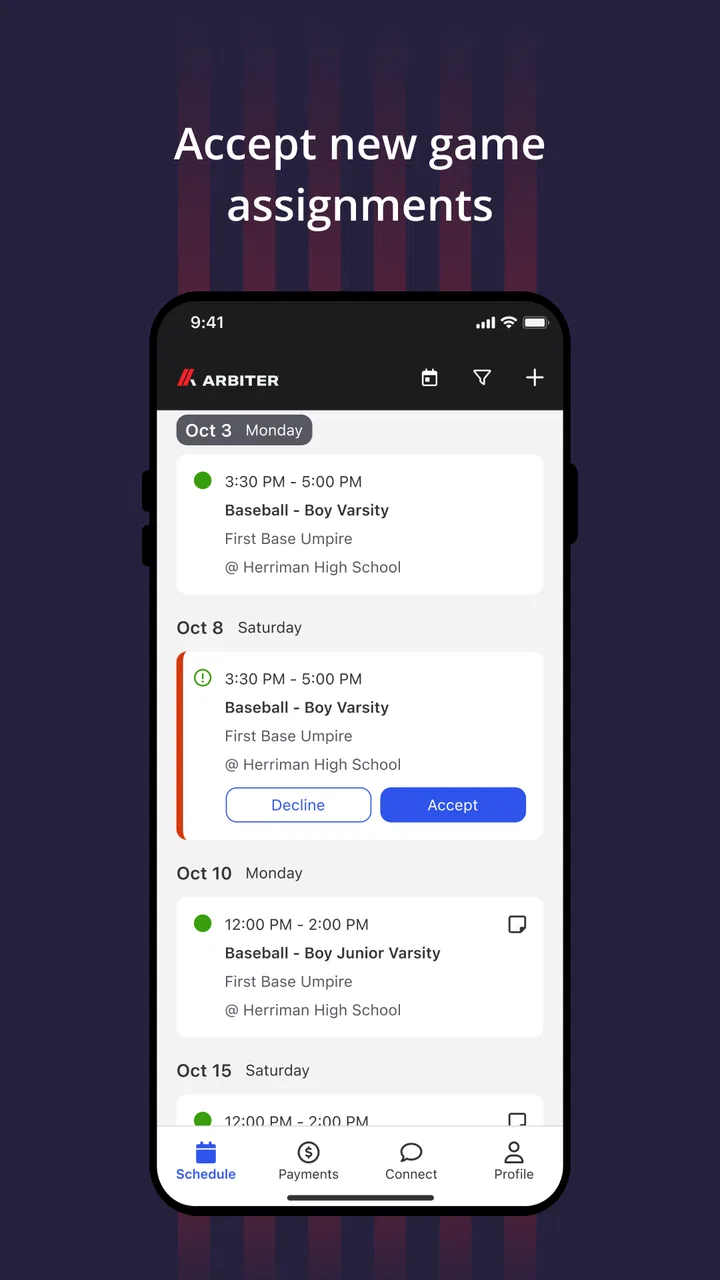
Imagine an official preparing for a busy weekend. Instead of searching through old emails and group messages to remember which assignment belongs to which day, the official can use the app as a central point for sports work. The practical benefit is not flashy. It is the ability to check responsibilities before leaving home, identify conflicts earlier, and avoid relying on memory when several events are close together.
For an assigner or league administrator, the same workflow can work in reverse. The app becomes useful when information has to move between the person organizing the event and the person expected to attend it. That is where a specialized service has an advantage over a generic calendar: the context is already connected to sports assignments rather than being reduced to a title, time, and location.
I would still keep a personal calendar for major commitments, travel, and family plans. That is an important trade-off. Arbiter can help organize the sports side of a schedule, but it should not automatically become the only place where someone tracks their entire life.
What makes the focused approach useful
The most convincing reason to use this app is that it speaks to a specific relationship between an organization and its officials. Generic messaging apps are quick, but conversations become difficult to search once a season gets busy. Spreadsheets can be flexible, but they depend on someone maintaining the latest version. A normal calendar is good for reminders, yet it usually lacks the surrounding sports context.
A dedicated platform can make those handoffs clearer. An official can approach the app with a question such as “What am I assigned to?” rather than “Which message had the latest update?” That change in mental effort is small, but it can be meaningful when the user is checking information while preparing for a game.
One useful habit is to review assignments before the day becomes hectic, not only when standing outside a venue. That gives the user time to notice a conflict or clarify an unclear responsibility while there is still an opportunity to fix it. The app is more valuable as a planning tool than as an emergency replacement for communication.
Current state, version context, and the user experience
The current release is version 1.9.0, while the app was first released on July 19, 2021. I see that as a sign of a product that has had time to establish its basic purpose rather than appearing as a brand-new experiment. At the same time, a version number alone does not tell me that every workflow will feel polished for every organization, so I would judge it by how well it fits the user’s existing process.
For someone joining an organization that already uses ArbiterSports, the app should be evaluated as part of that wider system rather than in isolation. The biggest benefit is likely to come when administrators and officials use the same service consistently. If only one side uses it while the other continues sending changes through unrelated channels, the user may still need to check several places.
That is one of the less obvious issues with coordination apps: adoption is a team decision. An individual cannot get the full benefit from a shared scheduling tool if the organization does not keep its information current. Before committing to it, I would ask the league or assigning group whether the app is part of its normal workflow, how updates are communicated, and which responsibilities remain outside the app.
The app has an average rating of 3.3 from around 429 ratings, with roughly 327 written reviews. I read that as a reason to approach it with practical expectations. The rating suggests that the experience is not universally smooth, but it does not make the app irrelevant. A specialized tool can be genuinely useful to the audience it serves while still frustrating people who encounter account, timing, or organization-specific issues.
What existing users may notice over time
For returning users, an updated version can be reassuring because it shows that the product is still being maintained. However, I would not assume that an update automatically changes the way an organization operates. The real improvement for an existing user comes when the people assigning events, accepting responsibilities, and checking schedules all use the current workflow consistently.
My advice to an existing user is to treat each update as a chance to recheck the basics. Confirm that the app is still installed on the device you actually carry, review notification behavior, and make sure your organization’s latest instructions are not being sent through a different channel. This is not glamorous maintenance, but it prevents a common mistake: assuming that having the app installed means every important update will be noticed.
It is also worth separating product changes from local administrative changes. If an assignment looks different, the cause may be an organizational decision rather than a new app feature. Keeping that distinction clear helps users report the right problem and avoids blaming the mobile app for a scheduling policy or communication gap.
Where the app compares well with usual alternatives
Compared with email, Arbiter has the potential to make sports responsibilities easier to find because the information is associated with the relevant activity instead of being buried in an inbox. Compared with text groups, it should be less dependent on a long conversation remaining readable. Compared with a paper schedule, it offers a more practical way to keep sports information available while moving between home, work, and venues.
Those comparisons are not a claim that the app replaces every alternative. Email remains better for detailed explanations and formal records. Messaging is often faster when an urgent human response is needed. A calendar is still better for combining work, travel, school, and personal commitments. The sensible setup may be to use Arbiter for the sports-specific source of truth and another tool for broader planning.
That division of labor is one of my strongest recommendations. Do not force the app to become a chat room, a personal planner, and a complete record system if your organization has better tools for those jobs. Use it where its sports context gives it an advantage.
Who will get the most from it
I would recommend Arbiter most readily to officials who receive recurring assignments, people responsible for coordinating sports events, and organizations trying to move away from disconnected scheduling methods. It may also suit a parent or volunteer who needs visibility into a sports role, provided the relevant organization actually uses the platform actively.
The app is less convincing for casual fans. If your goal is news, live scores, player statistics, training plans, or video, this is not the kind of sports app I would choose. It is also not ideal for someone who only participates in occasional informal games and has no need to manage formal assignments.
Another group that should be cautious is anyone who dislikes shared systems but expects instant personal control. Because the app’s usefulness depends on information entered or managed by an organization, the individual user may not be able to correct every problem alone. In that situation, a simple calendar or direct conversation may be more effective for a particular event.
Small workflow lessons that make a difference
My first practical tip is to check the app at a calm time and compare what you see with your own availability. Do not wait until travel has started. A scheduling tool is most helpful when it reveals a conflict early, when the assigner still has time to respond.
My second tip is to keep a backup habit for high-consequence events. For an important game, I would record the basic commitment in my regular calendar as well. That is not redundant in a bad way; the two tools serve different purposes. Arbiter can hold the sports context, while the personal calendar protects against forgetting the event among unrelated obligations.
My third tip is to use precise questions when something looks wrong. Instead of sending a vague message such as “My schedule is missing,” identify the event, the expected responsibility, and the part that appears incorrect. A specialized app can organize information, but clear human communication is still what resolves exceptions.
A fourth insight is about household planning. Officials often have commitments that affect other people, so checking an assignment is not only an individual task. Reviewing the sports schedule before the week begins gives a family or team time to plan transportation and other responsibilities. That is a benefit that may not be obvious from a short store description, but it is one of the reasons a coordination app can matter beyond the person holding the phone.
Remaining friction and reasons to look elsewhere
The main weakness is the dependency on participation. If an organization updates one system but communicates changes somewhere else, users may experience uncertainty rather than convenience. No app can fully solve a process problem caused by inconsistent administration.
There is also a learning curve for people who are not comfortable with sports-management software. A casual user may find a focused coordination tool less intuitive than a familiar calendar or messaging app, especially if they only need one piece of information. In those cases, the specialized context may not justify the extra step of learning another service.
I would also avoid treating a free price as proof that the app is cost-free in practice. The download does not remove the time cost of checking another channel, learning an organization’s process, or following up when information is unclear. For a large or active sports program, those workflow details matter more than the price shown in the store.
The app has over 50 thousand installs, which indicates that it has reached a meaningful audience without making it a universal sports platform. That scale fits my overall impression: Arbiter is a targeted tool. Its success should be measured by whether it helps a particular sports community coordinate better, not by whether it appeals to everyone who owns a phone.
What to watch before depending on it
If I were deciding whether to make Arbiter part of my regular routine, I would watch three things. First, I would see whether my organization treats it as the authoritative place for assignments. Second, I would observe how quickly changes appear when a game is moved or a responsibility changes. Third, I would pay attention to whether the app reduces follow-up messages or merely adds another place to check.
Those tests are more useful than judging the app by appearance. A simple interface can be excellent if the information is dependable, while a feature-rich app can be a poor fit if nobody keeps it updated. The key question is whether it removes uncertainty from the user’s particular sports workflow.
I would also keep an eye on how the product evolves after version 1.9.0. Future improvements would be most valuable if they make coordination clearer, reduce missed updates, and help users understand what requires action. I would not assume any specific upcoming feature, but those are the areas that matter most to someone deciding whether this app can support a real season rather than a single event.
For new users, the best starting point is simple: install it only after confirming that the relevant league, school, or assigning group uses ArbiterSports, then spend a few days comparing it with the organization’s normal communication method. That trial will quickly show whether it is becoming a reliable center for your assignments or just another notification source.
My recommendation after using it
Arbiter makes sense when your sports life includes formal assignments and shared coordination. I like its focused purpose because it addresses a problem that general sports apps usually ignore: the practical connection between the people organizing events and the officials expected to support them. The free availability and Everyone age rating also make it approachable for a wide range of sports communities.
Still, I would not recommend it blindly. Its value depends heavily on organizational consistency, and the average rating of 3.3 shows that some users have encountered enough friction to lower the overall impression. I would choose it over a pile of messages and spreadsheets when my organization actively supports it. I would choose a regular calendar, email, or direct communication instead when the app is not the shared source of current information.
My final view is that Arbiter is best understood as a practical specialist, not a complete sports companion. For officials and administrators, that specialization can be exactly what makes it worthwhile. For everyone else, it may feel unnecessarily narrow. The right decision depends less on how much sport you follow and more on whether you need to coordinate the work behind organized sport.
FAQs for Arbiter
01What is Arbiter, and what does it offer?
Arbiter is a comprehensive app designed to streamline decision-making processes by offering a suite of tools for voting, polling, and collaborative discussions. It provides users with customizable features, such as anonymity options and real-time updates, making it ideal for both personal and professional use. Available on Android and iOS, Arbiter helps groups reach consensus efficiently.
02Is Arbiter free to use, or are there in-app purchases?
Arbiter offers a free version with basic features suitable for casual users. For those seeking more advanced functionalities, there are in-app purchases and subscription options. These paid features include enhanced security measures, expanded participant limits, and additional customization tools, making the app adaptable to various needs.
03How secure is my data on Arbiter?
Arbiter prioritizes user security by implementing end-to-end encryption for all data transmitted within the app. This ensures that sensitive information, such as votes and personal details, remains confidential. Additionally, the app regularly updates its security protocols to protect against vulnerabilities and maintain user trust.
04Can Arbiter be used offline, and what are its limitations?
While Arbiter requires an internet connection for real-time updates and data synchronization, it does offer limited offline functionality. Users can draft discussions and prepare polls offline, which are then updated once connectivity is restored. However, live voting and real-time collaboration are not available offline.
05What platforms is Arbiter compatible with, and how user-friendly is it?
Arbiter is compatible with both Android and iOS devices, ensuring broad accessibility. The app features an intuitive interface with easy navigation, making it user-friendly for individuals of all tech-savvy levels. Its design focuses on simplicity without compromising on the depth of features, making it a popular choice for users.
Pros
- User-friendly interface for easy navigation.
- Rich content variety for diverse interests.
- Offline access for content on the go.
- Customizable notifications to stay updated.
- Seamless integration with social media.
Cons
- Occasional bugs disrupt smooth usage.
- Premium features behind a paywall.
- Frequent ads can be intrusive.
- Limited language support available.
- High data consumption on streaming.

Arbiter
Gallery